
Tax-Compliant ERP & SaaS Accounting Platform

The Localized Double-Entry ERP System

Effortlessly run your business accounts, sales pipelines, inventory health tracking, and manual journals. Automated with configurable sales tax, excise duty, and source withholding taxes.

app.flowledgerpro.com/dashboard
Dashboard
LIVE
Revenue
$2.4M
+12.5%
Invoices
847
+8.2%
Tax Compliance
98.5%
Tax Ready
Businesses
12
+2 new
Margin
34.2%
+3.1%
Revenue Trend+28.4%
USD thousands
Account Split
Total4.2M
Assets
40%
Liabilities
25%
Equity
20%
Revenue
15%
Cash Flow
+$700Knet
IncomeExpense
Tax Summary
$342Ktotal filed
Sales Tax (18%)$186,400
Withholding Tax (10%)$98,200
Excise Duty (5%)$57,400
Recent Activity
Invoice INV-004 created
2m ago
Payment from Acme Corp
1h ago
Q3 Tax return filed
3h ago
Inventory sync done
5h ago
Recent Invoices4 records
INV-001Acme Corporation
$117,000Paid
INV-002TechFlow Solutions
$59,670Paid
INV-003GlobalTrade Co.
$36,580Pending
INV-004DataSync Ltd
$24,500Paid

Illustrative dashboard preview using sample data; request an approved live-product walkthrough for current screens and limits.

How It Works

From setup to insights in three steps

Scroll through each step — watch how Flow Ledger Pro transforms your workflow.

1

Onboard Your Businesses

Add business entities according to your plan or configured account limit. Each entity gets an isolated double-entry ledger, separate tax registers, and custom fiscal year settings.

Multi-Entity
2

Record Transactions

Create sales invoices, purchase bills, inventory adjustments, and journal entries. Every transaction auto-posts to the general ledger with proper debit/credit mapping.

Double-Entry
3

Generate Reports & Stay Compliant

Access the accounting report catalog — Profit & Loss, Balance Sheet, Trial Balance, and aging summaries. Built-in tax fields support sales tax, withholding tax, and excise duty workflows.

Tax Ready
For buyers doing their homework

Understand the workflow, evidence, and boundaries before you choose.

Flow Ledger Pro connects accounting operations across sales, purchasing, inventory, projects, tasks, and reporting. The right fit depends on your jurisdiction, plan, number of businesses, and the controls you need to verify in a walkthrough.

Growing businesses

Bring sales, purchasing, inventory, and accounting records into one connected operating flow.

Accountants

Keep entity records, tax settings, approvals, and reports easier to review from a shared workspace.

Multi-entity operators

Use configured entity access and isolated ledgers where the selected plan supports more than one business.

A simple example

Invoice to ledger in four steps

  1. 1. Draft: create a quotation or sales document.
  2. 2. Approve: carry the approved terms into the next document.
  3. 3. Post: review the debit, credit, tax, and withholding values.
  4. 4. Report: follow the transaction into receivables and financial reporting.
QuestionPublished scopeWhat to verify
Sales tax, GST, withholding, and excise fieldsConfigurable transaction fieldsConfirm jurisdiction and filing scope
US state filing or remittanceNot stated as a filing serviceUse an appropriate tax professional
Multi-business supportPlan and account dependentPricing currently lists one business on Trial, Basic, and Standard
Screenshots and demo valuesIllustrative examplesNot customer results or a guarantee of configuration
Core product modules

One connected system for finance operations

Move from a customer request or supplier bill to a verified accounting record with the operational context still attached.

Order to cash

Quotes, sales orders, invoices, payments, and withholding records.

Procure to pay

Purchase orders, vendor bills, expenses, and payment controls.

Control the books

Inventory, tax, projects, tasks, and reporting in one operating view.

Revenue Automation

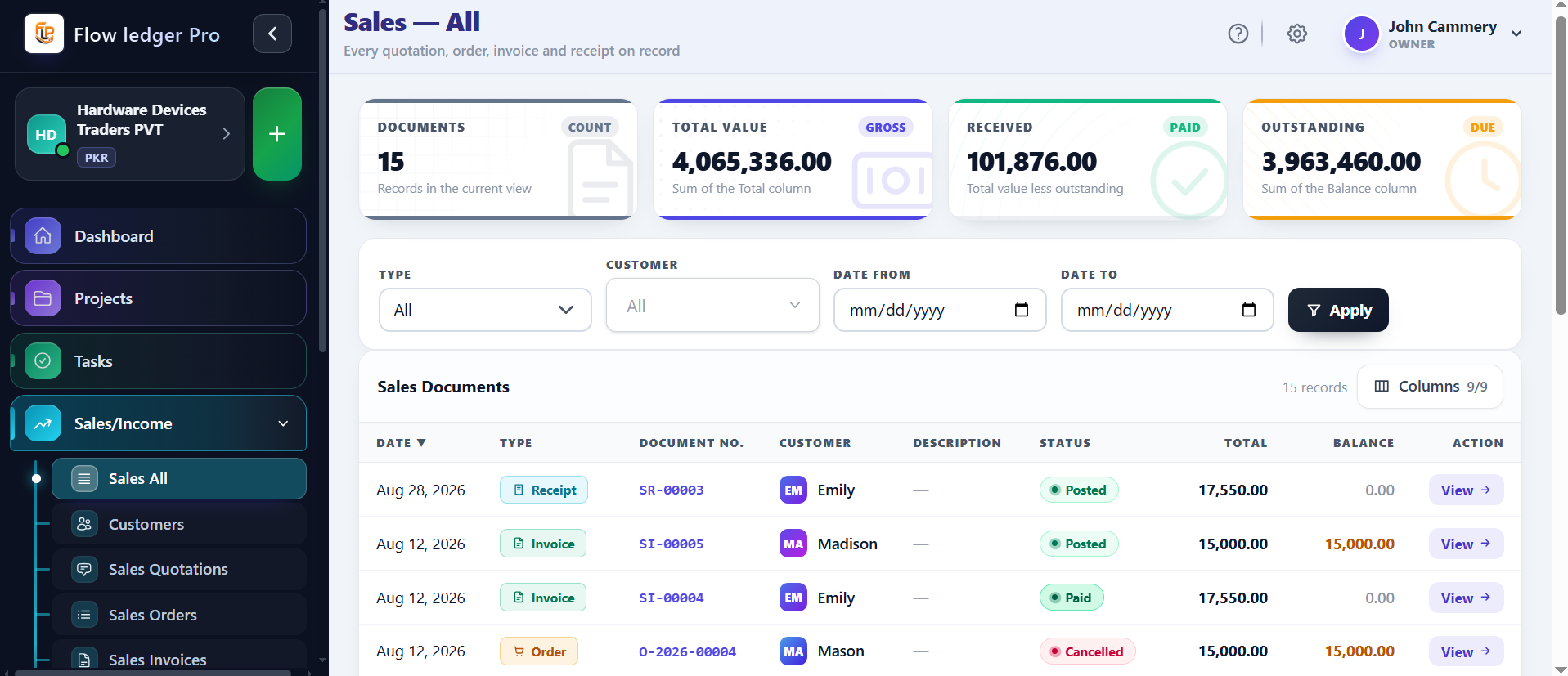
Fluid State Propagation (SQ → SO → SI → SR)

Eliminate duplicate data entry. Convert a customer-approved Quotation directly into an active Sales Order, auto-generate the tax invoice, and process withholding logs cleanly inside a single integrated stream.
  • Credit threshold checking with hard automated guardrails
  • Configurable payment term matrix for due-date generation
  • Localized calculation arrays for regional Sales Tax profiles
Explore Revenue Automation
Flow Ledger Pro sales module screenshot: Quotation to Sales Order to Invoice pipeline
Procurement Strategy

Traceable Vendor Outlays (PO → VI → VP)

Keep structural expenses balanced. Track incoming raw supplier purchase invoices and matching payment cycles directly tied to your internal Chart of Accounts asset classes.

  • Cross-entity matching (Customers who act as direct Vendors)
  • Direct, non-supplier corporate operational payouts (EP)
  • Dynamic chronological balance calculations per vendor
Explore Procurement Strategy
Flow Ledger Pro purchase management screenshot: Purchase Order to Vendor Bill to Payment pipeline
Asset Intelligence

Live Stock Control & Valuation Logs

Maintain absolute catalog transparency. Segregate trackable physical goods from operational flat services while establishing granular alert protocols across your entire warehousing network.

  • Rapid stock correction processing via Adjustment In / Out matrices
  • Localized income, cost, and asset routing per item class
  • Oversell blocks to prevent inventory deficits
Explore Asset Intelligence
Flow Ledger Pro inventory management screenshot: real-time stock control and valuation
Compliance Engine

Double-Entry Nominal Ledger System

The immutable core of your financial architecture. Seal finalized historical months with ironclad calendar lock dates to preserve past tax returns and eliminate retrospective tampering errors.

  • Balanced ledger validation checks running in real-time
  • Role-based granular access restrictions across bookkeepers
  • IP-whitelisting configurations for secure data access points
Explore Compliance Engine
Flow Ledger Pro accounting dashboard screenshot: double-entry ledger and lock date controls
Task Management

Unified Task & Activity Tracking System

Centralize team activities and task dependencies across all business operations. Track work status in real-time, automate workflows, and ensure accountability across departments with granular permission controls.

  • Real-time task status monitoring (Open, In-Progress, Completed, Closed)
  • Priority-based task queuing and deadline management
  • Team assignment & progress tracking with notifications
  • Integrated calendar views and timeline visualization
Explore Task Management
Flow Ledger Pro task management screenshot: real-time task tracking and team assignment
Project Management

Hierarchical Project & Sub-Project Orchestration

Organize complex initiatives into parent and child projects with full dependency tracking. Manage resource allocation, budgets, and timelines across enterprise portfolios while maintaining visibility into every deliverable.

  • Multi-level project hierarchy with sub-project management
  • Gantt chart & milestone tracking for resource planning
  • Budget allocation and project cost tracking
  • Stakeholder collaboration & approval workflows
Explore Project Management
Flow Ledger Pro project management screenshot: multi-level project hierarchy and Gantt tracking
Mobile App

Take Flow Ledger Pro With You

Stay connected to your business wherever work takes you. The Flow Ledger Pro mobile app listings describe access to approvals, sales, customers, projects, and financial reports.

It's a companion to the web platform. Sign in with your existing Flow Ledger Pro account; confirm current app availability, supported versions, permissions, sync, and offline behavior in the store listing and your account configuration.

What you can do on mobile

  • Approve or reject requests
  • Live cash position
  • Quotes, orders, invoices & receipts
  • Customers & CRM
  • Inventory & procurement
  • Financial reports
  • Projects & tasks
  • Multiple businesses, role-based access
Subscription Pricing

Plans that scale with your business

A quick look at the proposed Flow Ledger Pro plans. Compare every limit on the dedicated pricing page.

Pricing and limits shown are a proposal. Contact us to confirm current availability and terms.

Trial Plan

Free

14 days

Explore the core Flow Ledger Pro experience.

  • Three users
  • 50 sales invoices per billing period
  • 125 products and services
  • 256 MB storage
  • Standard support

Basic Plan

$19.99

Monthly

A practical foundation for growing businesses.

  • Three users
  • 100 sales invoices per billing period
  • 250 products and services
  • 512 MB storage
  • Email support
Most Selected

Standard Plan

$39.99

Monthly

More capacity for established operations and teams.

  • Ten users
  • 1,000 sales invoices per billing period
  • 5,000 products and services
  • 10 GB storage
  • Priority support

Custom Plan

Individually quoted

Customized

Tailored capacity and support for larger organizations.

  • Custom limits
  • Customized duration
  • Direct support contact
Support center

Frequently Asked Questions

Have questions about ledger mappings, tax compliance formulas, or pricing boundaries? Read through our core technical FAQ.

Flow Ledger Pro is a robust, cloud-based ERP and accounting platform built on standardized double-entry principles. When actions like a Sales Invoice (SI) are approved, our systems immediately write debit and credit registers to corresponding nominal accounts in the general ledger (Chart of Accounts Codes e.g. Accounts Receivable, Sales of Product Income, and sales tax/GST output taxes).
Flow Ledger Pro describes configurable fields for sales tax / GST, excise duty, and withholding tax. Rates, exemptions, filing, remittance, and jurisdiction coverage must be confirmed for the account and country; the site does not present the product as a universal tax filing service.
The Lock Date is a security mechanism managed by administrators (Settings > Lock Date). It prevents operators or accountants from adding, changing, or deleting ledger logs dated prior to a specified calendar date, typically used during month-end or fiscal year-end close to preserve closed period audit trails.
The site describes a customer-as-supplier setting that can connect related records. Confirm the exact matching, statement, balance, and tax-registration behavior in the live product before relying on it.
Multi-currency behavior is configuration-dependent. Confirm supported currencies, exchange-rate entry, conversion timing, rounding, and report presentation for your account before relying on a specific treatment.
The site describes a User Activity Log for reviewing actions and record context. Confirm event coverage, retention, timestamps, export behavior, and permissions in the live product before treating it as an audit control.
Flow Ledger Pro is positioned for businesses, accountants, and multi-entity operators that need double-entry bookkeeping alongside sales, purchasing, and inventory workflows. Entity capacity, isolated ledgers, and any consolidated reporting depend on plan and configuration and should be confirmed before purchase.
The published workflow connects quotations, sales orders, invoices, and receipts, with accounting context attached. Confirm which transitions are automatic or approval-gated and verify tax, withholding, and ledger posting behavior for your configuration.
The published inventory scope describes stock movements, adjustments, low-stock controls, oversell protection, and accounting relationships. Confirm live valuation method, rounding, warehouse limits, alerts, and posting maps for each item class.

We're Here to Help

Reach out for demos, pricing, or support — our team typically responds within one business day.

Get Support

Submit a ticket and our team will respond shortly.

    Live Portal

    See Flow Ledger Pro in action — explore the live dashboard, no signup required.

    Launch Flow Ledger Pro